Showing posts with label 5. Show all posts
Showing posts with label 5. Show all posts
Thursday, August 28, 2014
New Ipad 3 Manual User Guide For iOS 5 1 Software
 |
| Google Images |
Table Of Content For New Ipad 3 Manual User Guide
- At a Glance
- Getting Started
- Basics
- Safari
- Messages
- Camera
- FaceTime
- PhotoBooth
- Photos
- Videos
- YouTube
- Calendar
- Contacts
- Notes
- Reminders
- Maps
- Music
- iTunes Store
- App Store
- Newsstand
- iBooks
- Game Center
- Accessibility
- Settings
- iPad in Business
- International Keyboards
- Support and Other Information
Download free pdf manual user guide or operating instruction from apple.com here:

Saturday, August 23, 2014
Nokia Lumia 920 vs iPhone 5 price and top specs comparison
Since Stephen Elop, CEO, unveiled the Lumia 920 prototype in New York City On September 5, The Nokia Lumia 920 has gained a lot of attention from both the media and consumers. As Nokia�s flagship Windows 8 phone, many people are waiting for it, even though iPhone 5 has already been released part days ago. Now with the shopping season coming, AT&T is likely to launch the Nokia Lumia 920, which incorporates Windows Phone 8 operating system, Nov 11, states a BGR report.
The Lumia 920 and the iPhone 5 have many things in common, some of which are the exceptional industrial design cues, top-notch build quality, top internal specs and most notably, the synergistic hardware-software implementation that boasts an extremely robust and smooth-running software environment. Then many consumers are wondering which phone they should purchase. To help you make the best decision, it is necessary to explore both phones and the features each has to offer.

1. Design and Build
The most noticeable differences between the two phones is the build. Both are made with quality design. The iPhone 5 looks very much like the iPhone 4 and 4S, but it is slightly longer. Like its two predecessors, it is available in only black or white. The Nokia Lumia 920 boasts a beautiful polycarbonate unibody that is similar to the Lumia 900, except that it is glossy instead of including a matte finish. It is available in a variety of colors as well � yellow, red, black and gray.
The iPhone 5 is narrower and significantly lighter than the Lumia 920 which means that the device can be used easily with one hand compared to the latter; the Lumia 920 is also slightly thicker than the iPhone 5 which can be good or bad to some, just a little something to keep in mind.
2. Hardware

The iPhone 5s standby time lasts up to 225 hours on 2G/3G, up to 8 hours of talk time on 2G/3G, music playback of up to 40 hours and internet browsing of up to 10 hours.
The lumia 920 can last up 400 hours on standby mode under the 2G/3G networks, gives users up to 17 hours of talk time via 2G and 10 hours on 3G, music playback clocks in at around 67 hours.
As Engadget has proved it, the Lumia 920 is simply better, photography-wise, than the iPhone 5, especially in low-light

Engadget also proves that the 920 � which features optical image stabilization � bests the iPhone 5 when it comes to video recording, too.
On the hardware front, the Lumia 920 certainly wins over the iPhone 5 due to its hardware-related features.
3. Software
The iPhone 5 is powered with Apple�s own iOS 6 mobile operating system while the Lumia 920 runs on the new Windows Phone 8 operating system with a tiled user interface.

The Lumia 920 on the other hand boasts the Windows Phone 8 with a revamped UI which lets users gain even more control over their device�s Live Tiles UI, added HD resolution and multi-core CPU support, background multi-tasking, NFC and many others.
It�s worth noting that the Windows Phone Marketplace is still populating its app portfolio since Microsoft is having a hard time increasing the Windows Phone market share so they�re having difficulties luring-in developers to create apps for their mobile operating system as a result, thus, it still lacks in comparison to Google�s Play Store and Apple�s App Store.
Given that Microsoft seems to be gaining traction with the upcoming launch of the Windows Phone 8 and Windows 8 on the 29th of this month, it�s not too hard to see that the Windows Marketplace will no longer look like a ghost town in the next few quarters.
4. Price
The Nokia Lumia 920, according to sources from third-party retailers, is still more affordable than the Apple iPhone 5. Keep in mind that we�re talking about unlocked phones here. The latest price list shows that the Nokia Lumia 920 base model is sporting the tag price of $700, while the most affordable unlocked iPhone 5 is still expensive with $900 asking price. The original SRP or suggested retail price of the iPhone 5 is $650, but due to underwhelming supply, the phone�s price online is still unchanged.
As a conclusion, the Lumia 920 wins this duel thanks to its mightier spec list and Microsoft�s history in software development making the Windows Phone platform a viable choice for those who are planning to try a new mobile computing experience. So this time it is a good time to switch to the Nokia Lumia 920 as your next handset, whether you are an android user or iPhone fan.
Read More..
The Lumia 920 and the iPhone 5 have many things in common, some of which are the exceptional industrial design cues, top-notch build quality, top internal specs and most notably, the synergistic hardware-software implementation that boasts an extremely robust and smooth-running software environment. Then many consumers are wondering which phone they should purchase. To help you make the best decision, it is necessary to explore both phones and the features each has to offer.
1. Design and Build
The most noticeable differences between the two phones is the build. Both are made with quality design. The iPhone 5 looks very much like the iPhone 4 and 4S, but it is slightly longer. Like its two predecessors, it is available in only black or white. The Nokia Lumia 920 boasts a beautiful polycarbonate unibody that is similar to the Lumia 900, except that it is glossy instead of including a matte finish. It is available in a variety of colors as well � yellow, red, black and gray.
The iPhone 5 is narrower and significantly lighter than the Lumia 920 which means that the device can be used easily with one hand compared to the latter; the Lumia 920 is also slightly thicker than the iPhone 5 which can be good or bad to some, just a little something to keep in mind.
2. Hardware
The iPhone 5s standby time lasts up to 225 hours on 2G/3G, up to 8 hours of talk time on 2G/3G, music playback of up to 40 hours and internet browsing of up to 10 hours.
The lumia 920 can last up 400 hours on standby mode under the 2G/3G networks, gives users up to 17 hours of talk time via 2G and 10 hours on 3G, music playback clocks in at around 67 hours.
As Engadget has proved it, the Lumia 920 is simply better, photography-wise, than the iPhone 5, especially in low-light

Engadget also proves that the 920 � which features optical image stabilization � bests the iPhone 5 when it comes to video recording, too.
On the hardware front, the Lumia 920 certainly wins over the iPhone 5 due to its hardware-related features.
3. Software
The iPhone 5 is powered with Apple�s own iOS 6 mobile operating system while the Lumia 920 runs on the new Windows Phone 8 operating system with a tiled user interface.

The Lumia 920 on the other hand boasts the Windows Phone 8 with a revamped UI which lets users gain even more control over their device�s Live Tiles UI, added HD resolution and multi-core CPU support, background multi-tasking, NFC and many others.
It�s worth noting that the Windows Phone Marketplace is still populating its app portfolio since Microsoft is having a hard time increasing the Windows Phone market share so they�re having difficulties luring-in developers to create apps for their mobile operating system as a result, thus, it still lacks in comparison to Google�s Play Store and Apple�s App Store.
Given that Microsoft seems to be gaining traction with the upcoming launch of the Windows Phone 8 and Windows 8 on the 29th of this month, it�s not too hard to see that the Windows Marketplace will no longer look like a ghost town in the next few quarters.
4. Price
The Nokia Lumia 920, according to sources from third-party retailers, is still more affordable than the Apple iPhone 5. Keep in mind that we�re talking about unlocked phones here. The latest price list shows that the Nokia Lumia 920 base model is sporting the tag price of $700, while the most affordable unlocked iPhone 5 is still expensive with $900 asking price. The original SRP or suggested retail price of the iPhone 5 is $650, but due to underwhelming supply, the phone�s price online is still unchanged.
As a conclusion, the Lumia 920 wins this duel thanks to its mightier spec list and Microsoft�s history in software development making the Windows Phone platform a viable choice for those who are planning to try a new mobile computing experience. So this time it is a good time to switch to the Nokia Lumia 920 as your next handset, whether you are an android user or iPhone fan.
Tuesday, August 12, 2014
Samsung Galaxy S II Sold 5 Million Unit
Samsung Galaxy S II re-record the fantastic sales figures. Latest news mentioning that the Galaxy II as the best-selling smartphone sales reach 5 million units.
This phone is a new model that completes the previous model. Currently Samsung Galaxy II is spearheading a push advances the companys smartphone. With the achievements that, Samsung is now reported to have maintained a 56% market share in South Korean mobile phone market.
 Since launching the first time, on 29 April in South Korea, Samsung S Galaxy II is quite successful in the global marketplace. "Galaxy S II" took 85 days to reach the sales figures.
Some parts of the world are waiting for the presence of "Galaxy S II" for the first time, but it seems this will not last long. With rumors that the next iPhone will be available later this year, Samsung has released its best mobile phones to take advantage of the current market.
Read More..
This phone is a new model that completes the previous model. Currently Samsung Galaxy II is spearheading a push advances the companys smartphone. With the achievements that, Samsung is now reported to have maintained a 56% market share in South Korean mobile phone market.
Some parts of the world are waiting for the presence of "Galaxy S II" for the first time, but it seems this will not last long. With rumors that the next iPhone will be available later this year, Samsung has released its best mobile phones to take advantage of the current market.
Friday, August 8, 2014
Beyond Instagram 5 Best Camera apps for android should download on Christmas day
Once mentioned about camera application for android, we think of the nifty photo app Instagram. The app�s release on the Android platform created a flurry of hype that�s rarely seen for any mobile app, much less for any Android app. I have tested it on my HTC One X, I can see why the app is popular, which offer you a totally free, fun, and simple way to make and share gorgeous photos to your friends.
 However, with all the focus lately on Instragram, and its retro photography, I would like to share you some other noteworthy applications on Android. Try to Use these most popular camera apps to improve your life by take photos and edit them, especially for those who want to keep a good memory on Christmas day.
1. Camera360 Ultimate

1. Camera360 Ultimate
Camera360 is a worldwide popular camera and photo editor app, produced by PC World. This app can work full screen on phone with high resolution with numerous scenes providing for you. With this app, you can also edit the photo through editing tools such as brightness and white balance, while also having cartoonish and whimsical effects. Plus it is easy to share your photos to many main social platforms.
 Christmas Version: Xmas Pack for Camera360
2. Camera ZOOM FX

2. Camera ZOOM FX
Camera zoom FX is a very useful application which can be used to add extra zoom features to the digital camera included with your android mobile phone. This app can help you up to 10 shots per second + instant effects.
 Here are some of the highlights Features:
Pudding Camera is another app that you can use to customize your photos with. With its effects, it can make your photos look as if they have been taken with an analog film camera. Best of all, it is free.
 4. FxCamera

- Live previews of some effects, e.g. frames, buddies
- Silent camera (if device supports)
- Tweak hardware options: autofocus, whitebalance, nightshot...
- Settings for iso, focus metering, brightness, exposure, contrast, saturation, sharpness (based on device)
- 1-click upload photo to Facebook, Twitter, Flickr, etc.
- XHDPI support
Pudding Camera is another app that you can use to customize your photos with. With its effects, it can make your photos look as if they have been taken with an analog film camera. Best of all, it is free.

FXCamera is a very useful application which can be used to create some beautiful and unique looking photographs. This allows you to create an artistic photograph by applying various art filters. This is great for anyone who is used to using the filters included with Olympus cameras.


There are many different filters, effects and settings which can be adjusted to change the way your photos look. With some fiddling you will be able to get some great results.
5. Photo Grid HD
The app is the best collage creator on Android, which can make your photos collection into amazing collages. Adding photos is easy, and with a bit of clever cropping and placement, you can make fun mementos of trips and events. Even if you�re a photography amateur, you can add a bit of class and artiness to your photos with this fun app.
 I thought you might be interested in the latest Instagram stats:
� Instagram gains one new user every second
� Each day on Facebook 300 million photos are uploaded
� One billion photos have been taken with the app
� There are roughly 58 photos uploaded each second
You can download the latest Instagram App from here.
Read More..
5. Photo Grid HD
The app is the best collage creator on Android, which can make your photos collection into amazing collages. Adding photos is easy, and with a bit of clever cropping and placement, you can make fun mementos of trips and events. Even if you�re a photography amateur, you can add a bit of class and artiness to your photos with this fun app.

� Instagram gains one new user every second
� Each day on Facebook 300 million photos are uploaded
� One billion photos have been taken with the app
� There are roughly 58 photos uploaded each second
You can download the latest Instagram App from here.
Thursday, August 7, 2014
Samsung Unveils Omnia Pro 4 and the Omnia Pro 5
New mobile phones - Samsung also will soon launch two smartphones next generation of Windows Mobile-based Omnia ie Samsung Omnia Pro 4 and Omnia Pro 5. Both newfangled candybar and has a full QWERTY keyboard.

Samsung Omnia Pro B7350 4 is a sailing touch smartphone with 2.6-inch size is 320 x 320 pixel resolution and features a 3.2 megapixel camera with autofocus.
Samsung Omnia Pro B6520 5 is a smartphone which has a size of 2.4-inch landscape display with QVGA resolution and comes with 2 megapixel camera.
The rest of the smartphone has the same specifications such as using the operating system Windows Mobile 6.5.3, support 3G networks with HSDPA, WiFi, A-GPS, FM radio, Bluetooth, 1500 mAh capacity battery and microSD slot.
Samsung Omnia Pro 4 will slide in Europe and Asia in July 2010, while Samsung Omnia 5 will slide in Asia in August 2010. (Mobile88)
Read More..
Samsung Omnia Pro B6520 5 is a smartphone which has a size of 2.4-inch landscape display with QVGA resolution and comes with 2 megapixel camera.
The rest of the smartphone has the same specifications such as using the operating system Windows Mobile 6.5.3, support 3G networks with HSDPA, WiFi, A-GPS, FM radio, Bluetooth, 1500 mAh capacity battery and microSD slot.
Samsung Omnia Pro 4 will slide in Europe and Asia in July 2010, while Samsung Omnia 5 will slide in Asia in August 2010. (Mobile88)
Nokia X2 Comes With 5 Megapixel Camera

With a size of 2.2 inch touch screen display resolution 320 x 240 pixels, maybe this is a screen that has become standard, but the phone has a 5 megapixel camera, support for all GSM/EDGE, a 3.5 mm standard jack headphone jack, dedicated music keys, integrated FM radio tuner and has a built-in antenna, stereo speakers, has a 25 day standby capacity, the dam more than 13 hours of talk time.
Apart from that, this phone supports Bluetooth 2.1, and can be stuffed with 16 GB microSD memory card. This phone plans will be present in the market before June and sold only with a 85 EUR or $ 112 only.
5 Best alarm clock apps for Android to wake you up on time

Here in this article, I will show you the 5 best alarm clock apps available for the android phones in Google play store, just check the best one you like to download.
1. Alarm Clock Xtreme Free (Rated: 4.6)
 Alarm Clock Xtreme Free is an alarm clock app that not only wakes you up gently but also helps you avoid accidentally disabling your alarm. Now Integrates with new app Stopwatch Xtreme to solve all your timing needs.
With this app, you can customize your wake up time and use the app for reminders and timers throughout the day. Features include: Set your morning alarm to slowly increase in volume and wake you up gently; Use the extra-large snooze button or solve math problems to prevent you from accidentally turning off the alarm and so on.
The free version is full-featured but ad supported, so try to upgrade to the paid version to remove ads and internet permission. Of course you can have a try before you buy.
 Alarm Clock Plus is one of the fully featured and most stable Android Alarm App. With this app, you can create an alarm and setting it with a nice wake up tone like music and ringtone. You can also set the numbers of snoozes and configure the phone to quiz with maths problems to disable the alarm. Its default dock screen can display the weather and access to the photo slider. The most advance feature of this Alarm App is you can set application to launch like Pandora, email, news reader and other application when alarm sounds.
3. AlarmDroid (Rated: 4.5)

If you�re a heavy sleeper or someone who can pick up your phone, hit Snooze or Stop without opening your eyes, then AlarmDroid might be the right choice for you.
To shut your alarm up, you have to solve math problems, sort numbers, select divisible numbers, and answer the days of the week, or pair dice. You�ll be forced to figure out a way around the obstacles and by the time you�ve solved it, you�re already fully awake.
Unlike other Alarm clock apps, AlarmDroids special feature is the flipnsnooze feature, which allows the user to turn the alarm clock back into snooze mode by turning over the phone. Further, it provides a speaking clock, which does not only announce the time but even the local weather conditions.
4. Sleep as Android (Rated: 4.6)

This is an amazing Android Alarm app with sleep cycle tracker, which tracks your sleep and Wakes you gently in light sleep for pleasant mornings.
The app includes some important features such as sleep graph history, sleep debt status, rings natural alarms like birds, sea, storm with gradual volume up, etc. This Alarm app can record your sleep talk and snoring and it also shares your FaceBook and email accounts.
5. Wave Alarm (Rated: 4.3)
 Wave Alarm is not your ordinary alarm clock application. Wave Alarm offer a new way to wake up in the morning by makes use of the front-facing camera on your phone or tablet to snooze or dismiss alarms by letting you wave over the device. With Wave Alarm, you never have to touch your phone to silence or snooze, just wave off the alarm!
Other than the waving gesture support, the alarm has a cool non-standard looking bedside clock with date, time and local weather. The app is free, with a $2.99 unlock key to remove ads and give you more color and alarm options.
Pick one suit for you most. Hopefully one of these 5 Best alarm clock apps for Android will be able to wake you up at a nice mood.
Read More..

With this app, you can customize your wake up time and use the app for reminders and timers throughout the day. Features include: Set your morning alarm to slowly increase in volume and wake you up gently; Use the extra-large snooze button or solve math problems to prevent you from accidentally turning off the alarm and so on.
The free version is full-featured but ad supported, so try to upgrade to the paid version to remove ads and internet permission. Of course you can have a try before you buy.
2. Alarm Clock Plus(Rated: 4.5)

3. AlarmDroid (Rated: 4.5)

To shut your alarm up, you have to solve math problems, sort numbers, select divisible numbers, and answer the days of the week, or pair dice. You�ll be forced to figure out a way around the obstacles and by the time you�ve solved it, you�re already fully awake.
Unlike other Alarm clock apps, AlarmDroids special feature is the flipnsnooze feature, which allows the user to turn the alarm clock back into snooze mode by turning over the phone. Further, it provides a speaking clock, which does not only announce the time but even the local weather conditions.
4. Sleep as Android (Rated: 4.6)

The app includes some important features such as sleep graph history, sleep debt status, rings natural alarms like birds, sea, storm with gradual volume up, etc. This Alarm app can record your sleep talk and snoring and it also shares your FaceBook and email accounts.
5. Wave Alarm (Rated: 4.3)

Other than the waving gesture support, the alarm has a cool non-standard looking bedside clock with date, time and local weather. The app is free, with a $2.99 unlock key to remove ads and give you more color and alarm options.
Pick one suit for you most. Hopefully one of these 5 Best alarm clock apps for Android will be able to wake you up at a nice mood.
Wednesday, August 6, 2014
iPhone 5 is the last project of Steve Jobs
iPhone 5 is last project of Steve Jobs | According to one analyst, the iPhone 4S is not the last big project for Steve Jobs. Even Jobs could call the last project is the iPhone 5, which became a product is eagerly awaited by most fans of Apple.
CNET confirmed this with their own source revealed that "Steve Jobs" was not involved with the iPhone 4S but rather focus his energy on the iPhone 5.

Another source close to the information saying that the iPhone 5 has been redesigned "This is a very large project by Steve dedicated to dedicate all his time to the mobile phone."
Rodman & Renshaw analyst, Ashok Kumar, wrote in a research note this week that he expects the iPhone 5 being a "cult classic", with the involvement of Jobs there.
Kumar said that the phone will be more streamlined and has a larger screen size but with the same dimensions as the iPhone 4S. iPhone 5 is also expected to support the network of Long Term Evolution (LTE), or commonly referred to as 4G. According to Kumar, the appearance of the prime 5 is expected when the Apple iPhones Developers Confrence in the summer of 2012.
Read More..
CNET confirmed this with their own source revealed that "Steve Jobs" was not involved with the iPhone 4S but rather focus his energy on the iPhone 5.

Another source close to the information saying that the iPhone 5 has been redesigned "This is a very large project by Steve dedicated to dedicate all his time to the mobile phone."
Rodman & Renshaw analyst, Ashok Kumar, wrote in a research note this week that he expects the iPhone 5 being a "cult classic", with the involvement of Jobs there.
Kumar said that the phone will be more streamlined and has a larger screen size but with the same dimensions as the iPhone 4S. iPhone 5 is also expected to support the network of Long Term Evolution (LTE), or commonly referred to as 4G. According to Kumar, the appearance of the prime 5 is expected when the Apple iPhones Developers Confrence in the summer of 2012.
Monday, August 4, 2014
iPhone 5 Manual User Guide
iPhone 5 user manual guide free pdf download instruction book online operating Setting Troubleshooting Support - iPhone 5 has the basic ingredients of glass and aluminum, but not too heavy because it has a weight of 112 grams with a thinness of just 7.6 mm, is thinner than the thinnest Android phone today, Huawei Ascend P1.
iPhone 5 has a 4 inch screen with a resolution of 1136 x 640, so the new iPhone homescreen will feature as many as 5 pieces of the menu bar. Not another 4 lines like the previous generation iPhone-iPhone.
Not to forget, the iPhone 5 is also already supports LTE 4G network alias. This LTE network supports some parts of the world that already have jarigan LTE. For Asia, the iPhone 5 supports 4G LTE network in SingTel, SmarTone, SK Telecom, and Soft Bank.
On my machine, the iPhone 5 has the latest processor from Apple, the Apple A6 processor. A6 offers the ability to process the data and graphs are 2 times faster than the previous generation processor, the Apple A5 processor.
 |
| Google Images |
On the side of the camera, unfortunately the iPhone 5 will only have a powerful 8 megapixel camera with aperture of f/2.4., The same as the iPhone 4S. But the difference, camera iPhone 5 already has a panorama feature.
iPhone 5 can also record high-quality video with 1080p quality. Interestingly, users can capture still photos while recording video.
On the front side, the iPhone 5 has a second camera with a resolution of 1.3 MP which can record HD quality video, which can be used for video calls over 3G or 4G network operator (native video call) or via FaceTime or other IM apps like Skype.
iPhone 5 has a new dock connector cable with 8 pin. This connector is approximately 80% smaller than the older models the connector type. The good, Apple already provides adapters for users who still have the old Apple accessories, old accessories so it can be used again.
Smartphone with iOS 6 is apparently available in two separate models between CDMA and GSM, not combined as in the model of the iPhone 4S has two networks in one body.
Both models namely A1428 A1429 GSM and CDMA models support the connection LTE, HSPA +, and DC-HSPA, but will operate at different frequency bands, depending on the operator. Apple also lists other models, namely A1429 model that supports the GSM frequency bands more than the version of the A1428.
iPhone 5 will be equipped with the latest version of iOS, the iOS 6. And will present the (fixed) in 2 colors, black and white only. Unfortunately, Apple is not interested in making blue or silver.
How to Use the VoiceOver rotor control?
Use the rotor to choose what happens when you swipe up or down with VoiceOver turned on. Operate the rotor: Rotate two fingers on the iPhone screen around a point between them. Change the options included in the rotor: Go to Settings -> General -> Accessibility -> VoiceOver -> Rotor and select the options you want to be available using the rotor.
How to pair a Bluetooth device with iPhone?
1. Make the device discoverable. See the documentation that came with the device. For an Apple Wireless Keyboard, press the power button.
2. Go to Settings -> Bluetooth and turn Bluetooth on.
3. Select the device and, if prompted, enter the passkey or PIN. See the instructions about the passkey or PIN that came with the device.
How to create a shortcut?
Go to Settings -> General -> Keyboard, then tap Add New Shortcut
To know more about complete quick operating guide and troubleshooting tips of iPhone 5, please download this iPhone 5 user guide.
Download iPhone 5 user guide.pdf (13.59 MB)
Sunday, August 3, 2014
Apple iPad 2 Manual User Guide iOS 5 0 iOS 4 3 Software 3G Wi Fi PDF
Apple iPad 2 Manual User Guide iOS 5.0 iOS 4.3 Software 3G + Wi-Fi PDF
 Download Apple iPad 2 Manual User Guide iOS 5.0 iOS 4.3 Software 3G + Wi-Fi PDF - Before your new iPad, iPad 2? If you do it, before you understand in hands you are on Walking 11, 2011 through AT & T or Operator Verizon (for 3G WiFi), it enhanced that you know what the tube 2 iPad are doing or what the tube iPad not perform. It is not enough if you only know the specs or skin texture iPad 2 notes however, you must know how to enjoy it close.
As the official said, iPad 2 into the latest Operating System by type of Apple: The IOS Software 4.3, 2 iPad Addict Addict Channel Handbook (in PDF Channel, as is now open) and become a fan of the Series IOS. It is understood is known as the iPad 2 Channel Addict to IOS 4.3 Software. Before we tube convince the share the Channel Addict iPad 2, let the dawn with talking rough skin texture and Specifications brought by Lozenge iPad newest, Download Apple iPad 2 User Manual Guide IOS IOS 5.0 4.3 Software 3G + Wi-Fi PDF.
Skin Texture New (hardware iPad 2 different types of iPad (first generation, iPad 1), is a dual camera-friendly in the body iPad:. Front and Back This tube is used to go through Apple Video Work Video Webcam and Works named FaceTime. News Another superior even to the price that almost matches the first iPad, iPad 2, exclusively used Apple A5 Principal dual 1GHz CPU (speed mainframe) It has been. long claimed to give you a high performance system with a power consumption of the poorer.
If you want to know how to enjoy the camera like to get shot photos or video recording, distribution and vieving photos and videos with your friends, trimming video, or even upload photos or videos to your desktop computer, you tube dawn to find out how to do it by reading "Chapter 6: Camera" which opens on page 60 to page 62 (60.61, and 62) on Channel 2 for the iPad Addict Software IOS 4.3. This clearly treats do you have 2 matching iPad from Verizon or iPad 2 from AT & T.
If you equivalent to see how to relish the Camera much as to obtain a Pic Pic or to recording the Recording, system and vieving the picture and video with your friends, cut the video or flatbottomed uploading the icon or video to your screen machine, you tin penetrate to cognize how to do that by indication "Chapter 6: Camera" that undetermined on the attendant 60 to attendant 62 (60,61,and 62) on the Enthusiast Guide of iPad 2 for iOS 4.3 Software. It definitely the twin treat whether you had iPad 2 from Verizon or iPad 2 from AT&T.
Ok for those of you who want to get to and download the manual or have Apple iPad 2 Manual User Guide iOS 5.0 iOS 4.3 Software 3G + Wi-Fi PDF please click here & get download
Ok for those of you who want to get to and download the manual or have Apple iPad 2 Manual User Guide iOS 5.0 iOS 4.3 Software 3G + Wi-Fi PDF please click here & get download
Sunday, July 27, 2014
5 best Free Android calendar apps you should download in 2013
The calendar plays a very important role in our daily life, whether keeps track of the meetings you have or remind us about the work, and so much more. So download a calendar app on your android device is really necessary and helpful. Android has a ton of really, really great calendar apps, here is the 5 best Free Android calendar apps I have picked that you should download in 2013.
Source from: Top 6 Best Calendar Apps for Android Mobile Phones on Google Play
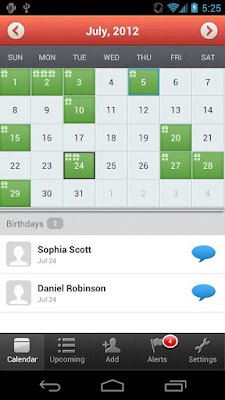 Top1: MyCalendar
With MyCalendar app, you will never forget your friends birthdays again! This app takes note of your friends birthdays and sets up notification so you can easily message your friends and wish them "Happy Birthday�.
To start with, add friends� birthday from your Facebook and your contacts list. Then Customizable reminder settings and others.
Key Features:
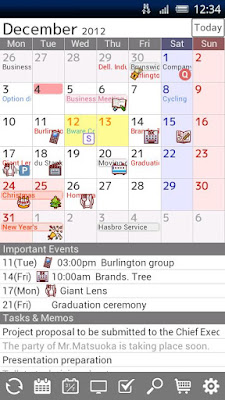 Top2: Jorte Calendar
With over 13 million downloads, Jorte is one of the most popular calendar/organizer applications, which can show your tasks list under your calendar, and show your days agenda under the month view when you click on it.
Features:
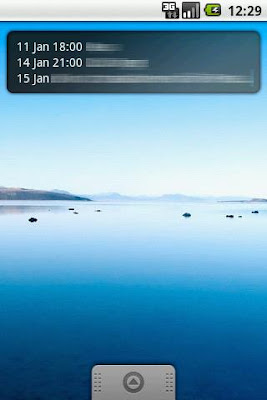 Top3: Smooth Calendar
This app is really simple to use, and have a clean, good looking calendar widget. It displays multiple upcoming events and automatically synchronizes calendars with the built-in Google calendar. The key customizations offered with this application are the choice of display, number of events to be displayed and number of days the user would like to check an event for. Further, the ability to change the size and color of the widget is also offered.
Features:
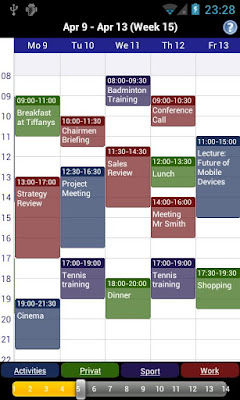 Top4: Business Calendar Free
Business Calendar is a complete calendar application that is synchronizing with your Google calendars! It comes with a great and smooth interface where you just pinch to zoom in and out. Instead of having views for "week", "4-day", "month", and so on, you start with a month view and can tap and drag on a certain set of days to shrink the view to those days.
Features:
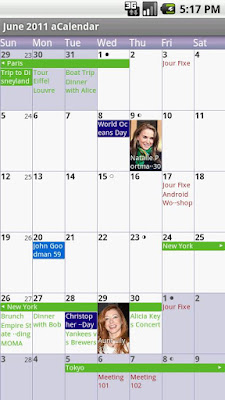 Top5: aCalendar - Android Calendar
aCalendar is a great free application that shines with its great and unique weekly view of events. Flipping right and left takes you in monthly and daily views, but what we love the most is the huge tiles for the weekly view, and the widget is also great. What we don�t like that much is the lack of integration with Google Maps.
Features:
Read More..
Source from: Top 6 Best Calendar Apps for Android Mobile Phones on Google Play

With MyCalendar app, you will never forget your friends birthdays again! This app takes note of your friends birthdays and sets up notification so you can easily message your friends and wish them "Happy Birthday�.
To start with, add friends� birthday from your Facebook and your contacts list. Then Customizable reminder settings and others.
Key Features:
- Import birthdays from Facebook
- Add birthdays of all contacts from your phone and add custom birthdays
- Customizable reminder settings: delivers notifications straight to your iPhone)
- Easily message your friends and wish them "Happy Birthday " along with custom message with just one click!

With over 13 million downloads, Jorte is one of the most popular calendar/organizer applications, which can show your tasks list under your calendar, and show your days agenda under the month view when you click on it.
Features:
- Jorte Cloud: Original Cloud feature for multi-device use and backup.
- Various widget settings are available.
- Monthly and Weekly views are available.
- Important appointments are shown in red.
- See completed appointments at a glance.
- It can synchronize with Google Calendar.
- Adjust the starting day of the week on each view; it doesnt always have to be Sunday!
- Import the Holidays of your choice from Google Calendar.
- Import and Export the contexts to CSV format.
- It can be controlled using Google Voice Search and Google Maps.

This app is really simple to use, and have a clean, good looking calendar widget. It displays multiple upcoming events and automatically synchronizes calendars with the built-in Google calendar. The key customizations offered with this application are the choice of display, number of events to be displayed and number of days the user would like to check an event for. Further, the ability to change the size and color of the widget is also offered.
Features:
- Many different options and features, can Displays anything from one to six upcoming events. Smooth Calendar has one of the highest satisfaction rates currently off all android widgets, currently a 4.5 rating on the android market.
- Can schedule events up to one year into the future!
- Ability to sync up with your Google calendar on your desktop computer is painless and easy.

Business Calendar is a complete calendar application that is synchronizing with your Google calendars! It comes with a great and smooth interface where you just pinch to zoom in and out. Instead of having views for "week", "4-day", "month", and so on, you start with a month view and can tap and drag on a certain set of days to shrink the view to those days.
Features:
- smooth scroll- and zoomable multi-day view (1-14 days)
- graphical and textual presentation
- month, agenda, day and event view
- quickly fade in/out calendars using the favorite bar
- search function
- configurable widgets in different sizes for month, week, agenda and day view (3 design themes for each widget type)
- easy switching between timeline bars and event titles in month view
- intuitive new handling option: just move your finger over some days of interest in month view to open them in the multi-day view
- quick day overview when adding a new event
- many options for recurrent events (e.g. to add a recurrent event that takes place every other week on Tuesday and Thursday)

aCalendar is a great free application that shines with its great and unique weekly view of events. Flipping right and left takes you in monthly and daily views, but what we love the most is the huge tiles for the weekly view, and the widget is also great. What we don�t like that much is the lack of integration with Google Maps.
Features:
- intuitive navigation with smooth transitions
- day, week & month calendar
- 48 colors per calendar, per-event color if supported by the calendar (Android Jelly Bean with Google Calendar only)
- custom event font size
- Fullscreen widgets
- flexible recurrences (e.g., every 3 weeks)
- birthdays & anniversaries with photos from your addressbook and editing
- Duplicate events
- uses Androids native calendar backend and synchronization
- no battery drain
- moon phases and zodiac signs for birthdays
- QR barcode sharing of events
- NFC sharing (if supported by the device) NEW
- 12/24h clock honoring system settings
- optimized text display and improved line-break
- free
- no ads
Here Wish all of you have a better life with these apps.
List 5 Gadgets Failed in Year 2010

1. Microsoft Kin Phone - Early release, Microsoft believes this phone will favored by young people because of easy access to social networks like Facebook and Twitter. Unfortunately for no apparent reason this phone is not sold until Microsoft finally reduce the price and then pull it from circulation. This could be a big lesson for Microsoft in the mobile arena.
2. Toshiba Folio - Tablet indeed was in its heyday, making other manufacturers outside of Apple are competing to produce superior products that most tablet-based Android. Unlike the fate of the Galaxy Tab, Folio tablets made by Toshiba is apparently failed. Consumers complained of weakness of many of this product and return it to the store.
3. Palm Pre 2 - The first product the combined results of HP and WebOS is less in demand because it is considered outdated in terms of physical hardware or software.
4. ViewSonic ViewPad 10 - Again, this Android tablet again failed, despite offering the ability booth dual OS (Windows 7-Android), these tablets still failed to lure consumers. One reason for the embedded Android version is still version 1.6 aka Donut, while Windows 7 is not quite suitable for touch screen implementation.
5. 3D Television - This time, the gadgets that are discussed are not specific to one brand but the overall 3D Television. Although quite sophisticated and has been sold to the public, but the official price attached to it is still very expensive. Also still need glasses 3D television as a tool to enjoy the effects that can not be enjoyed for too long, as well as its contents are still rare. You could say the new 3D TV will be a trend in recent years.
Friday, July 25, 2014
Nokia Lumia 920 vs Apple iPhone 5 the Lumia 920 win in stabilization shootout
Several days ago, a job ad posted by Nokia on employment network LinkedIn sees the company looking to hire a senior engineer to work on new mobile devices and software, people naturally think Nokia is consider to shift toward Googles Android operating system, which have a dominate share in the smartphone market. But according to a recent twitter from Doug Dawson, who heads up the companys media relations, he says Nokia will not shifting toward Googles Android operating system, and the job ad is only for HERE Maps support for other platforms, including iOS and Android. In order to found its way to get a successful comeback in the smartphone market, Nokia�s new Here Maps for iPhone and iPad launched in the App Store on Nov 19,2012, as Apple also release its own Maps after the iPhone 5.

Now let�s come back to Nokia�s new camera smartphone, once mentioned Nokia�s Flagship Windows 8 phone, we will think of its Lumia 920, which have an unparalleled Camera with PureView Technology. On October 28, 2012, I have compared the Lumia with iPhone 5 in aspect of price and top specs, etc. Today, I will update the comparison on the camera between Nokia Lumia 920 and Apple iPhone 5.
As all we know, Nokia made a pretty big deal of the stabilization feature of its Lumia 920 smartphone, which captures an impressively smooth clip even with exaggerated hand shake. The handset comes with the Floating lens technology, which is real optical image stabilization, as opposed to the digital solution of its competitors.
Naturally, we were very curious to find out how big a difference the new technology makes, and tech website gsmarena decided to pin the Nokia Lumia 920 against the Apple iPhone 5 (which has the most efficient digital video stabilization we have seen so far). The result show as below:
The results were somewhat surprising �You can see for yourselves in the video below. Don�t forget to go fullscreen and select the 1080p option.
Above the video, the difference isn�t really major at first glance � each of the two super phones has its moments of superiority in the video. You�d probably find a difficult to tell which one uses optical stabilization and which one is simply employing a cleverly designed software algorithm, If we hadn�t named the two halves, don�t you? However, for its stabilization to work so well, the iPhone 5 is forced to use only the central part of its sensor, while the Lumia 920 can use the whole thing, which gives it both a wider viewing angle and the option to do pixel binning, which helps fight digital noise.
So the Nokia Lumia 920 takes this round, even if the margin of its victory is smaller than we anticipated.
Of course, this is just one scenario and the optical image stabilization might turn out to be more beneficial on other occasions. Website gsmarena will do some more tests before the review is complete so we�ll know how good Floating lens actually is.
For personally, I like the Lumia 920 very much and prepared to buy one as Christmas Gift. So what is your opinion? I am very curious to know your thoughts about this. Welcome to leave your opinion if you are fond of this article.
Read More..
Now let�s come back to Nokia�s new camera smartphone, once mentioned Nokia�s Flagship Windows 8 phone, we will think of its Lumia 920, which have an unparalleled Camera with PureView Technology. On October 28, 2012, I have compared the Lumia with iPhone 5 in aspect of price and top specs, etc. Today, I will update the comparison on the camera between Nokia Lumia 920 and Apple iPhone 5.
As all we know, Nokia made a pretty big deal of the stabilization feature of its Lumia 920 smartphone, which captures an impressively smooth clip even with exaggerated hand shake. The handset comes with the Floating lens technology, which is real optical image stabilization, as opposed to the digital solution of its competitors.
 |
Update: We saw there�s some confusion so we felt we should clear this out. The two smartphone were attached to a stand, rather than being held in two hands as that puts them on equal footing. The test itself starts with some casual panning, which is followed by walking in place and jumping. |
The results were somewhat surprising �You can see for yourselves in the video below. Don�t forget to go fullscreen and select the 1080p option.
Above the video, the difference isn�t really major at first glance � each of the two super phones has its moments of superiority in the video. You�d probably find a difficult to tell which one uses optical stabilization and which one is simply employing a cleverly designed software algorithm, If we hadn�t named the two halves, don�t you? However, for its stabilization to work so well, the iPhone 5 is forced to use only the central part of its sensor, while the Lumia 920 can use the whole thing, which gives it both a wider viewing angle and the option to do pixel binning, which helps fight digital noise.
So the Nokia Lumia 920 takes this round, even if the margin of its victory is smaller than we anticipated.
Of course, this is just one scenario and the optical image stabilization might turn out to be more beneficial on other occasions. Website gsmarena will do some more tests before the review is complete so we�ll know how good Floating lens actually is.
For personally, I like the Lumia 920 very much and prepared to buy one as Christmas Gift. So what is your opinion? I am very curious to know your thoughts about this. Welcome to leave your opinion if you are fond of this article.
5 Capability S Galaxy which is worth Offsetting

This product is a premium-class mobile phone, beside Omnia, which carry Windows Mobile. What causes this phone was in 'caste' of the Samsung phone?
Super Screen AMOLED
Not only armed with Active-Matrix Organic Light-Emitting Diode (AMOLED), like Samsung Wave, Galaxy, S-screen carrying the super nodes named Super AMOLED. Compared with AMOLED, the technology is claimed to be lighter, 80 percent reduced reflection of sunlight, and 20 percent more power efficient.
To prove the clarity, detikINET comparing three different technologies to respond 12 hours of sunlight at noon. AMOLED technology is owned by Galaxy Super S, AMOLED HTC's Desire, and TFT-LCDs of Sony Ericsson Xperia X10 mini-pro.
Although exposed to the sun dazzled him, Samsung Galaxy S proved to be more clearly demonstrated than AMOLED display's menu HTC and Sony Ericsson TFT LCD. Not only that, the phone displays are also not easily soiled by the hand and scratch-resistant seal.
To prove it, scratch the glass detikINET phone with a bike lock and do not cause scars scratches on the screen. Nothing like the iPhone and some other touch screen phones, this phone seems to have no longer needs anti-scratch coating.
4 Inch Screen
Unless Dell Streak the soon-screen will appear with five inchinya, Galaxy S is one of the widest-screen Android phone today. Carry the 4-inch screen size, users will feel 'better' when watching YouTube or read a pdf file.
While the resolution, this phone has a 800x480 pixel size. Not only that, this phone also is equipped for 5 megapixel autofocus camera and video recording capabilities up to 720p (30fps).
Internal memory 16 GB
Read more �
Subscribe to:
Posts (Atom)
